Showing posts with label Gigabyte. Show all posts

Thursday, November 3, 2011

ASUS P8Z68-V Pro Motherboard

 A reasonably plan box is used by ASUS for their P8Z68-V Pro board with a number of logos telling us about the key features. Inside we find a decent bundle which includes software, drive cables documentation, Q-Connectors, Q-Shield (two key items which assist with a PC build) and an additional USB 3.0 bracket with two ports available.
ASUS use a black ATX PCB for this board with plenty of blue hardware and as expected this is a Z68 board, though Lucid Virtu technology is also present. Two large aluminium heatsinks cool some of the power circuitry around the socket 1155 CPU location and these are joined by a passive chipset cooler at the bottom right of the board.

 Also dotted around the PCB are ASUS's own power design circuitry components, including an Energy Processing unit which monitors power consumption and along with this ASUS use a new VRM design (DIGI+) to maximise efficiency, reduce heat and improve reliability and stability. TPU, which stands for TurboV Processing Unit, is another on-board processor which allows us to overclock/enhance the board with minimal effort.
Finally, as this is a Z68 board it features support for all socket 1155 CPUs, including the high end i7-2600K with the ability to select multipliers in the BIOS.

 Down at the bottom left of the board we find the add-in card slots and these run from PCIe 1x through PCIe x16, PCIe x1, PCI, PCIe x8, PCI and PCIe 4x. These sit above our onboard power and reset buttons and as with the Gigabyte board on the last page quad GPU setup's are supported.


ASUS supply eight SATA ports which are split into four SATA 3GB/s (light blue) and four SATA 6GB/s (grey/dark blue). Two of the higher speed SATA ports run through the Marvell 912x controller and to ensure all of our connectivity runs at optimum speed the Intel based ports support RAID 0, 1, 5 and 10. Then beside the dark blue ports we find a connector for front panel USB 3.0 devices which runs on an ASMedia controller.

 Further up the board we find four dual channel memory slots which are capable of holding 32GB of memory with official support hitting 2000MHz+. These slots sit alongside a standard 24-pin power connector and the board also features an 8-pin socket. Then over at the edge of the board is the MemOK button which assists us in maximising compatibility with problematic memory sticks.


 Round on the back panel we find there is no PS/2 socket, instead the connectivity starts with 4x USB 2.0 which sit alongside two further USB 2.0, Jmicron eSATA, Bluetooth, optical audio, HDMI, DVI, VGA and Intel 82579 GB LAN. 3.5mm audio in/out which uses the 8 channel Realtek ALC892 chipset are also present as are two further USB 3.0 ports which use a second ASMedia controller.

Of course the presence of video out means we can take advantage of our on-board Intel GPU if we wish.

Software/BIOS

One of the key benefits of moving to an ASUS Z68 based system is the option of choosing a board with the new and improved UEFI BIOS with GUI support.
The BIOS GUI is best shown in video form (above) and as demonstrated it has full mouse/keyboard functionality and an improved look and feel over previous BIOS versions. This makes changing settings much easier, even for novice users.


The new BIOS is split into two sections, Basic and Advanced. Enthusiasts will want to head over to the advanced section to access options such as AI Tweaker for overclocking, essentially offering the same functionality as an old style BIOS. Additionally EZ Flash is included which allows us to flash our BIOS from a USB drive quickly and easily.

ASUS also supply a very thorough software suite which gives us a massive level of control over the board and its monitoring features and can also check for BIOS updates. Added to this we have the ability to control our board via smartphone (Bluetooth) and there are also bundled extras such as Norton and Disk Unlocker which maximises support of 3TB drives.


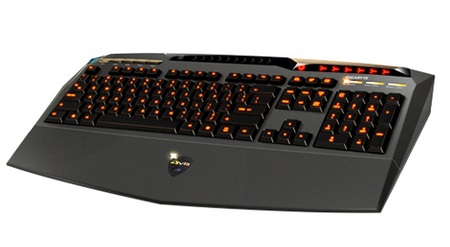
Gigabyte Aviva M8600 Gaming Mouse and K8100 Gaming Keyboard

The Aviva M8600 Gaming Mouse


May 5, 2011 - 06:04 PM | Jeremy Hellstrom

Gigabyte has joined in the attempts of many companies to convince gamers that wireless mice are cool. With 50 hours of battery life and 6500DPI sensor the Aviva M8600 sounds good on paper but until you get it on the mat you will never know how well it performs. Hardware Secrets were certainly impressed by its ambidexterity, they were just as uncomfortable using it with the left hand as with the right. No complaints about input lag though.


"Gamers usually shun wireless peripherals, always wary of a possible energy loss. No one wants to rummage around for a cable and lose an online match. With that in mind, Gigabyte has released a wireless gaming-grade mouse with a long lasting 50 hour battery that comes with an extra battery that you can rapidly switch. Besides those characteristics, the Aivia M8600 reaches 6,500 DPI and features a design for both right- and left-handed users, plus ten reprogrammable buttons. Let's talk first about its physical aspects and then test its wireless operation."

The Aivia K8100 Gaming Keyboard

The idea behind specialized “gaming keyboards” has been around for many years and there have been quite a few very successful designs introduced throughout this time. However, in the vast majority of cases these specialized products are usually nothing more than slightly modified standard keyboards with some extra “gaming” features tacked on. To us this always seemed counter intuitive as the needs of a hardcore PC gaming enthusiast tend to greatly differ from that of a typical end user.

To this end Gigabyte has created a new concept dubbed the “Advanced, Intuitive, and Versatile Interface Archetype” or AIVIA which has been designed from the ground up to focus primarily upon the distinct needs of gamers. Today we will be looking at the first AIVIA peripheral: the K8100, a keyboard with a unique set of features and specifications.

Unlike most other keyboards, the K8100 comes in an absolutely gigantic box. This isn’t due to an abundance of padding but rather because Gigabyte has designed an absolutely immense peripheral.

Before we look at the software on the accompanying installation CD we would like to make special note of the fact that Gigabyte has also included a water-proof silicone key protector, spare W, A, S, D keys and a even a key puller tool.

To be honest, we were absolutely in love with the improved Gigabyte GHOST software which accompanied our GM8000 Xtreme mouse, as it was as easy on the eyes as it was to use. A literal carbon copy of this software is used for the K8100 with a few modifications included for easier macro key programming.

The software interface consists of only one main screen and one secondary screen which simplifies things quite a bit when compared to other peripheral software. The main screen allows drag and drop “pre-built” macros into one of the 25 available slots. Each horizontal slot represents one of the five macro keys (and is labelled 1 through 5 at the top of this grid), with vertical rows representing each of the colour coded macro modes. This makes for an intuitive and easy to use visual setup as you just drag and drop the commands into areas which are the most convenient for your playing style. Meanwhile, the upper left hand corner not only tells you which mode you are in and customizing but it also uses a simple graph to represent how much onboard memory is left.

If the pre-built macros are not to your liking and something beyond the admittedly basic included macros is needed, the secondary screen is where that perfect custom macro can be built from the ground up. Simply pressing the big red “easy button” key in the upper right hand side of the main screen (aptly called Macro Editor) opens up a large secondary screen for this custom macro building. Inputting custom key settings meanwhile is a thing of beauty since a few clicks is all that’s needed to start defining scripts.

This really is one of the best software suites we have ever seen accompanying a gaming keyboard since both prebuilt along with some extremely heavy handed custom macro designs can be implemented with absolute ease. As an added bonus, a single installation of the GHOST software is compatible with any supporting peripherals so both keyboards and mice can be controlled through the same interface.

Hardware Canucks review for the Gigabyte Aivia K8100 Gaming Keyboard