Showing posts with label Asus. Show all posts

Wednesday, November 23, 2011

ASUS Sabertooth 990FX AM3+ Motherboard Review


Author: MAC
Date: May 30, 2011

  By now everyone reading this article should know that AMD is on the cusp of releasing their eagerly anticipated Bulldozer architecture. On the desktop side of things, Buldozer will be released as processors with the Zambezi designation. Naturally, these new 8-core CPUs and their derivatives will use the AM3+ socket so new motherboards will be released to support them. Enter the 990 series of chipsets, a slightly different spin on the outgoing 890 series. For the purposes of this article we will be concentrating upon the enthusiast-oriented 990FX chipset.

   The differences between the 890FX and the new 990FX chipsets are much less significant than the name change would have you believe. Truth be told, the 990FX Northbridge is basically a carbon copy of its predecessor with a slight change in the microcode structure in order to support the unique needs of AM3+ CPUs. It is paired with a 950 Southbridge which is nothing more than a rebadged SB850 chip. Luckily, the SB850 was forward looking enough that changes weren’t necessary as it already supports SATA 6G. Combined, the “new” Northbridge / SouthBridge combination has more enough PCI-E 2.0 lanes to support any current third party USB 3.0 controller as well.

  AMD’s “new” range of 900-series motherboards spans the upper end of their market and will initially consist of the 990FX and 990X chipsets.

   The “990FX” may indeed sound new but it is nothing more than an 890FX with updated microcode to support upcoming Zambezi processors while the 950 Southbridge is simply a rebranded SB850 chip. Is this a bad thing? Well, we don’t think so because the 890/850 combination used on previous boards proved to be forward thinking enough that many of its features (like SATA 6G and USB 3.0) are still in their infancy and have a long way to grow.


   One of AMD’s most distinguishing features over the last few product generations has been their commitment to offering backwards compatibility for their motherboards and forwards compatibility on the processor end of things. Even though the 990FX series boards will feature support for upcoming AM3+ processors, the socket layout makes them compatible with all current AM3 processors as well. This will allow current and slightly older processors to be used on these boards. So while 990FX may not seem like an upgrade for 890FX users, it is a no-brainer purchase for people who want an AMD platform now but are worried about what’s coming down the pipeline.

   While Intel has transferred most of their Southbridge functionality to their processor die, AMD has staunchly adhered to a two-part chipset configuration consisting of a Northbridge and a Southbridge. We have seen this layout persist through the 790FX days on to the 890FX and now once again on the 990FX. This may change in the future, for the time being all current AM3 processors and upcoming AM3+ products only feature on-chip DDR3 memory controllers while all the I/O and expansion slot functions are handled through the chipset. We also get native support for DDR3 1333Mhz memory while the processor and 990FX Northbridge communicate through a Hypertransport 3.1 link at 6.4 GT/s. Yes, that's an upgrade which will likely benefit processors.

   The Northbridge of AMD’s two-chip solution acts as a controller hub for most of the board’s PCI-E 2.0 lanes and facilitates communication between the SB950 and the processor. The 32 dedicated graphics card lanes are split up into either two 16x slots or can be evenly dispersed for up to a quartet of 8x slots which gives the boards incredible flexibility for multi GPU setups.

   After a long hiatus, SLI finally sees the light of day on an AMD chipset with support through NVIDIA’s driver stack. This is a huge step for both AMD and NVIDIA and it could open up some new markets for these motherboards.

   Meanwhile, the remaining ten PCI-E 2.0 lanes are divided up into one grouping of four lanes while an additional six lanes 1x lanes can be dispersed as needed for integrated components like audio and networking controllers.

   This layout tells us a thing or two about the Bulldozer-based Zambezi CPUs which are due out in the coming months. It seems like their baseline interface with supporting motherboards hasn’t changed much from the current generation of processors which means they’ll retain the on-die memory controller while supporting DDR3 speeds of 1333Mhz. This can be counted as a good thing for consumers and motherboard manufacturers alike since motherboards will likely stay relatively inexpensive compared to their Intel competitors.

   Moving on down to the SB950, we see that AMD has once again foregone any updating as the layout is absolutely identical to that of the SB850. The chipset interconnect still uses a 2GB/s interface dubbed “Alink Express III” which essentially uses four PCI-E 2.0 lanes to speed up on-board communications.


   Speaking of the Southbridge, we see that AMD has retained 6Gbps SATA support but still hasn’t progressed to native USB 3.0 support. Third party USB 3.0 controllers can be interfaced to the Southbridge or Northbridge chipsets using the 1x PCI-Express 2.0 lanes for a maximum theoretical throughput of 500MB/s.
   As with almost every past AMD isn’t about to let their clientele out in the cold so the 990FX is backwards compatible with current AM3+ CPUs. So you can buy in confidence without worrying about any upgrade paths closing a few months down the road.

   It seems like this new chipset and the upcoming Bulldozer processors have sparked quite a bit of interest among certain industry circles. Some motherboard manufacturers like ASUS will be adding features to their 990FX boards which weren’t seen on previous generations. Things like UEFI support, SLI certification (with NVIDIA’s blessing) and dynamically expanded overclocking options were all MIA from the 890FX boards but will now be included alongside an AM3+ socket.

   An expanded set of capabilities doesn’t necessarily mean that 990FX boards will begin edging up in price either. Take the subject of today’s review for example: the ASUS 990FX Sabertooth. It sports a laundry list of features alongside components which are durable enough that ASUS gives it a 5-year warranty. It’s price? $209 before rebates. If that isn’t tempting, we don’t know what is…


  As we have come to expect from ASUS, this motherboard has a well though out layout. The 8-pin CPU power connector, 24-pin ATX power connector, eight SATA ports, USB 2.0 and FireWire headers are all ideally located on the edges of the motherboard. We do however wish that the front panel USB 3.0 header was located at the very bottom of the motherboard, instead of below the memory slots where effective cable routing/hiding can be little more difficult.

   This motherboard features a new 8+2 phase DIGI+ VRM digital power design, which is similar to the one we saw on the P8P67 PRO. Part of the DIGI+ VRM design are the Dual Intelligent Processors 2 (DIP2), consisting of the independent EPU (Energy Processing Unit) and TPU (TurboV Processing Unit) controllers. Thanks to the digital VRM and the TPU controller, this motherboard has extremely precise 0.005V voltage increments, five levels of Load-Line Calibration (LLC), very fast VRM phase switching with fine 10KHz switching frequency adjustments. The EPU controller monitors CPU loading and controls the number of active power phases, while also adjusting the voltages and multipliers on-the-fly in order to regulate power consumption. It is also connected to the chipset and memory VRMs, and optimizes their power efficiency as well. The main benefits of this new DIP2 design are that you can have full control over the system settings without using any CPU resources, and it’s no longer necessary to choose between power management (EPU) and overclocking (TPU).

   From what we can tell right now, all of these new AM3+ motherboards will feature a black socket. It is a minor but effective way of differentiating AM3+ from the older AM2/AM2+/AM3 sockets. Those with eagle eyes will also notice that the AM3+ socket on this Sabertooth model features two small raised parts whose purpose is currently a mystery to us. We also believe that the pin holes look slightly wider, but don’t quote us on that.

   Another distinctive change is the two-part heatsink mounting bracket, which differs from previous implementations, but also appears to be a ASUS-specific change instead of one mandated by AMD.

   The two CPU fan headers are a terrific addition that we hope becomes a standard feature on all slightly higher-end motherboards.

  While the MOSFET heatsink is obviously a very robust looking piece, what really draws the eye is its unique texture. It is covered in CeraM!X, which is ceramic coating technology that ASUS only uses on The Ultimate Force (TUF) series motherboards.

  This model only features one perfectly located 8-pin CPU connector, which is probably a good sign that AM3+ processors will not be power hogs, at least we are hoping.

   The Sabertooth 990FX has a pretty cool looking northbridge heatsink to our eyes. Part of this is obviously due to the CeraMIX coating that gives it a really gritty appearance. This heatsink doesn’t feature a particularly high fin density, but the way the fins are spaced ensures that they can really make use of any available airflow. The northbridge cooler is connected to the MOSFET heatsink via a flattened copper heat-pipe.

  The Sabertooth’s DDR3 memory slots officially support up to DDR3-1866, which is one of the benefits of the 990FX chipset, but ASUS have also validated this motherboard for overclocked operation up DDR3-2000. The 2-phase power design for the memory slots will have no issues handling the load. We are glad to see that ASUS are continuing the user-friendly Q-DIMM memory slot design, which is clip-less on one end. The reason for this innovative design is simply to make it easier to remove the memory modules.

  In the top-right corner is the MemOk! button, which can be used to fix any memory compatibility issues in order allow the system to boot. As we come to expect, the 24-pin ATX power connector is right on the edge of the motherboard, exactly where it should be.

  This motherboard comes with a front-panel USB 3.0 header, and is one of the first to feature the new ASMedia ASM1042 USB 3.0 host controller, which as you will see later has much better performance than previous USB 3.0 implementations.

  The modern looking and low profile southbridge heatsink also features the unique ceramic-coating. It really doesn’t have much to cool, so form over function is not really a big deal in this case.

  This motherboard features 8 right-angle SATA ports, 6 of which are supplied by the ‘new’ SB950 southbridge, which is identical to the previous SB850 southbridge. These six brown ports are all SATA III 6Gb/s and support RAID 0,1,5,10, JBOD, while the two black ports are SATA II 3Gb/s and come from a JMicron JMB362 controller.

Full review from Hardware Canucks for the "ASUS Sabertooth 990FX AM3+ Motherboard"

Monday, November 14, 2011

NVIDIA 3D Vision 2 and The Asus VG278H LCD Review


Friday, October 14, 2011 - by Marco Chiappetta

  When we first took a look at NVIDIA’s 3D Vision technology a couple of years ago, we came away impressed. We understand that gaming and watching video in 3D isn’t for everyone, but after using NVIDIA’s first 3D Vision kit with one of Samsung’s then-new 120Hz LCD displays, we truly enjoyed the experience. Not only was a new dimension (literally and figuratively) added to the games we played, but there were inherent advantages to using a 120Hz LCD, both when 2D gaming and just working on the desktop. There was no denying NVIDIA had an uphill battle convincing gamers to put on a pair of beefy, active-shutter glasses, and spring for a new monitor, but for those that took the plunge, there were definite benefits.

   Since its initial introduction, NVIDIA has put significant effort in to continually improve its 3D Vision technology and ecosystem. Almost 600 games—both old and new—are now supported, the price has come down significantly on the glasses, tons of 3D content is now available on 3DVisionLive.com and YouTube, and a number of partners have released 3D Vision capable monitors, like Asus, Planar, Acer, Viewsonic, LG and of course Samsung. There are also some monitors and notebooks now available that feature integrated 3D Vision IR emitters (and bundled glasses), so users don’t have to have to use an external USB emitter at all. We actually took a look at a couple of 3D Vision ready monitors not too long ago if you’d like to see some examples.


    If you are not familiar with NVIDIA’s 3D Vision technology, take a look at our initial launch coverage for the complete low-down, because we’re not going to cover everything again in this piece. Our launch articles explains how the technology works, how to install and use it, and features a few example videos of 3D Vision in action—although the videos cannot and do not do the technology justice. To quickly reiterate some of what is covered in the launch article, 3D Vision basically takes a pair of high-quality active-shutter glasses, and couples them with a USB IR transmitter, which keeps the shutters in-sync with the 3D content being displayed on a compatible screen, using NVIDIA’s proprietary software / drivers. Since launch, the base technology hasn’t changed much, but NVIDIA has learned much from the initial batch of products and is ready to unveil its newest iteration, 3D Vision 2.

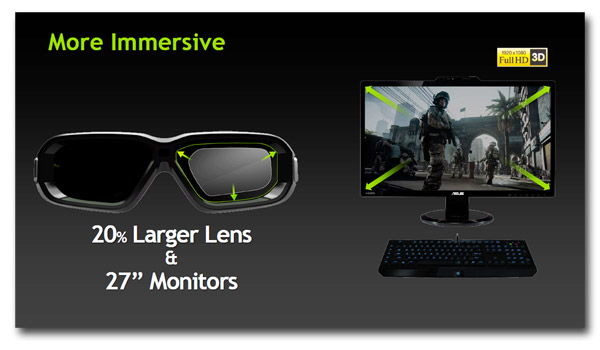
  On many levels, 3D Vision 2 is very similar to 3D Vision. The technology works in exactly the same way. It uses the same software, and the new glasses we’ll be showing you later are backwards compatible with the original emitters. Conversely, the original 3D Vision glasses are forward compatible with newer 3D Vision 2 kits. But NVIDIA has made a number of physical and technical tweaks that enhance the technology in a few key ways. NVIDIA has redesigned its active-shutter glasses and incorporated 20% larger lenses and worked with ecosystem partners to bring new, larger, full-HD 3D Vision compatible monitors to market. They’ve also developed a new technology dubbed LightBoost that ultimately results in brighter on-screen imagery and better environmental lighting characteristics as well.

   We’ll talk more about the new 3D Vision 2 glasses and a new Asus VG278H monitor that works with the technology a bit later. For now, let’s talk LightBoost for a bit.

  One of the complaints from users using virtually any active-shutter 3D technology is that on-screen images appear darker than they normally would when viewed in standard 2D mode. The darkening of on-screen images is an unfortunate side-effect of the glasses alternatively blocking light to each eye in rapid succession. Lightboost combats this issue in a couple of ways.

   Lightboost is enabled by the LED backlighting in the display. Lightboost pulses the backlight at double brightness when in 3D mode, to brighten on-screen 3D images. 3D LightBoost increases the power of the LED backlight in the monitor to pulse twice as brightly in unison with the LCD lenses in the 3D Vision glasses. This simply wasn’t possible with older 3D monitors and laptops that featured CCFL lamps, because they can’t pulse or switch on and off fast enough, with consistent brightness.

   Another advantage to Lightboost has to do with how the active-shutter glasses and screen are synched. With older monitors that feature CCFL lamps that are on all the time, both lenses in the original 3D Vision glasses were forced into a dark phase, where both lenses were blacked-out, while the image shifted from the left to right eye, and vice versa. Since the LED backlights can switch on and off so quickly in-between frames with Lightboost capable monitors, refreshing at 120 times per second (120Hz) with a 2ms response time, the 3D Vision 2 glasses can ultimately let more light through because they don’t have to enter this double-black phase.

  The end result is that more ambient light gets through to your eyes, so you can see things in the environment, like your keyboard or mouse for example, much better.

  NVIDIA’s new 3D Vision 2 glasses share some similarities with the originals in terms of their lense shape overall look, but a number of aspects have been tweaked for better performance and comfort.


  As we mentioned on the previous page, the lenses used in the 3D Vision 2 glasses are 20% larger, to allow for wider viewing angles. The shape of the glasses has also been changed slightly to better wrap around the wearer’s head and there is a ridge along the inside-top end that helps block more light, for better immersion.


  NVIDIA says the glasses feature a “gaming inspired design”, but what that means isn’t exactly clear; they just look like a hardcore pair of sunglasses to us. Additional design cues include NVIDIA badges on both sides, and new, slimmer arms, made from a soft composite material. Instead of wrapping around the wearer’s ear, the arms on the new glasses hug the head, so they’ll fit easily under a headset and are more comfortable during longer gaming sessions. The glasses also include adjustable nose-pieces to ensure a better fit for users and even allow enough room to fit over some prescription eyewear underneath.


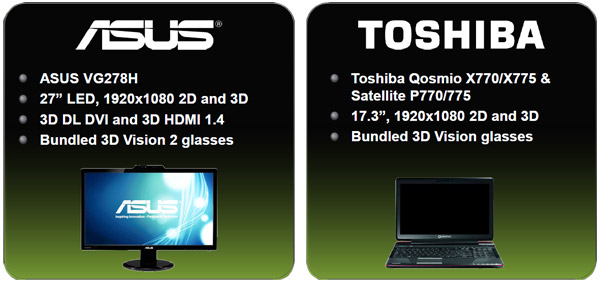
   In addition to the new 3D Vision 2 glasses, NVIDIA has also worked with its partners to help bring Lightboost enabled notebooks and monitors to market. Toshiba has a couple of notebooks already in the works, and although we don’t have confirmation just yet, others are likely to follow suit. Asus is also at the ready with a 27” Lightboost enabled LCD—the VG278H—which we were able to test out with a pair of the new 3D Vision 2 glasses.

  The Asus VG278H monitor is a non-nonsense display that’s unmistakably geared for gamers. The fact that the VG278H will ship with a pair of 3D Vision 2 glasses is the obvious first hint that the display is 3D capable and supports NVIDIA’s 3D Vision technology, but there are other cues throughout that hint at this monitor’s gaming prowess as well.


  For a 27” LCD, the Asus VG278H sports a relatively thin bezel; it’s not tiny by any means, but there is only about .75” of bezel that wraps the top and sides of the screen and about 1” along the bottom edge. Centered along the top, there is an angular protrusion that extends upwards about another .5” that houses the built-in IR emitter. Said protrusion is adjustable so users can set the perfect angle for a good line-of-sight shot at the 3D Vision 2 glasses and it features a small, silkscreened tagline that reads, “Ready for 3D games and videos”.


  The Asus VG278H features height and swivel adjustment, a built-in cable guide, and a heavy round-base that is emblazoned with a “3D” logo. The entire enclosure, with the exception of a small area on the IR emitter is a flat black and the screen has an excellent anti-glare, matte finish. The overall look of the screen is somewhat subdued and really nice, in our opinion.


Others features and specifications of the Asus VG278H include:
Display size: 27″, 16:9 Widescreen, LED backlight
Panel Technology: TN (Twisted Nematic)
Resolution: 1920×1080 @ 120Hz
Contrast ratio: 1000:1 / 50,000,000:1 (Dynamic)
Brightness: 400 cd/m2
Response Time: 2ms (gray-to-gray)
Internal speakers: 3W x2 Stereo
Connections: HDMI, DVI-D (Dual-Link), D-Sub, HDMI 1.4, Earphone Jack


  In terms of its specifications, there isn’t much that jumps out as extraordinary. The Asus VG278H has a 27” panel with a native resolution of 1920x1080 and a120Hz refresh rate. Brightness is rated for 400 cd/m2, which is above average, and its grey-to-grey response time is a snappy 2ms. Inputs include HDMI 1.4, DVI-D (Dual-Link), D-Sub, 3.5mm audio in and an earphone jack. We should also point out that the monitor has built in speakers and can play audio from both the analog and HDMI inputs. That means users can connect a device like a Blu-Ray player or console, and have audio. And surprisingly, the speakers aren't half bad. Highs and midranges are crisp and clear, but bass levels leave something to be desired. What the specs don’t convey is the uniformity of the backlighting, but we’ll talk more about that a little later.

  At the lower, right corner, along the bottom edge of the Asus VG278H is an array of controls, which thankfully use actual buttons. The buttons are clearly labeled with small icons printed on the edge of the front bezel and offer unmistakable tactility. The buttons are big enough, and have enough travel that they can’t be missed which is a nice surprise in this day and age of tiny or touch-sensitive buttons.


  Hitting one of the controls brings up an easy to navigate on-screen display that give’s users access to a plethora of options. All of the typical controls for brightness, contrast, color temperatures, etc. are present, along with some options to alter the IR mode and Lightboost settings. There are three IR modes that control the power of the IR signal to minimize interference to nearby devices. The intensity of Lightboost can also be altered, or toggled on or off as well.

Hot Hardware "NVIDIA 3D Vision 2 and The Asus VG278H LCD Review"

Intel Core i7-3960X Extreme Edition Sandy Bridge-E CPU


Monday, November 14, 2011 - by Marco Chiappetta

  We’ve been in this business here at HotHardware for a long time now. For most of that time, we’ve heard from countless so-called "industry experts" that the PC is dead, or at the very least dying. Quite frankly, we’re sick of hearing it. The PC is far from dead. One has to look no further than Intel's most recent finanical results, or even the contents of this website. In fact, we’d argue that the PC is more pervasive than ever. The PC isn’t dead, it just so happens to be one of the most flexible and versatile pieces of technology in existence, and it has simply gone through a number of transformations in its illustrious lifetime. What was once a non-descript, beige box good for little more than word processing and spreadsheets is now the sleek, aesthetically pleasing, hub of our digital world, that can take many different shapes. And despite its impending doom, today the PC is about to become more powerful than ever.

   November 14th, 2011 marks the release of Intel’s Sandy Bridge-E microarchitecture and its companion X79 Express chipset. Sandy Bridge-E is the ‘tock’ in Intel’s tick-tock release schedule cadence, that bridges the gap between current Sandy Bridge processors and next year’s, totally new Ivy Bridge microarchitecture. The first processor to arrive in the SBE line-up is the Core i7-3960X Extreme Edition, a six-core chip poised to knock Intel’s aging Gulftown-based processors from their position atop the PC food chain, one that they've held for almost two years.

We’ve got a Core i7-3960X Extreme Edition in house, along with a handful of X79 Express-based motherboards, and have pitted them against an assortment of high-end processors in an array of benchmark scenarios. Our results are laid out for you on the pages ahead, but before we get to the juicy performance details, let’s get some of the particulars out of the way first; specifications coming right up...


Intel Core i7-3690X Extreme Edition Processor
Specifications & Features


Core Frequency:
3.3GHz (Up To 3.9GHz w/ Turbo)
QPI Speed:
6.4GT/s
TDP (Thermal Design Power):
130W
Number of CPU Cores:
6 (12 Threads w/ HT)
Intel SmartCache:
15MB
L2 Cache:
1.5MB (256K x 6)
Processor input voltage (VID):
.95v
.032-micron manufacturing process
Shared Smart Cache Technology
Enhanced Intel SpeedStep Technology (EIST)
Extended HALT State (C1E) Enabled
Execute Disable Bit (XD) Enabled
Intel 64 Technology
AES-NI: Processor instructions
Intel Virtualization Technology (VT)
Packaging - Flip Chip LGA2011
Total Die Size: Approximately 434.7mm2
Approximately 2.27B Transistors
Price - $950

Six Core Processing: Runs 6 independent processor cores in one physical package

Base Processor Frequency: 3.30 GHz

Massive PCI Express Bandwidth: 40 lanes of PCIe supported through the processor

Intel Turbo Boost Technology: Dynamically increases the processor frequency up to 3.90GHz when applications demand more performance. Speed when you need it, energy efficiency when you don’t.

Intel Hyper-Threading Technology: 12 threads provide unprecedented processing capability for better multi-tasking and threaded applications. Do more with less wait time.

Intel Smart Cache: Up to 15MB of shared cached allows faster access to your data by enabling dynamic and efficient allocation of the cache to match the needs of each core significantly reducing latency to frequently used data and improving performance.

Overclocking Enabled: Core (Turbo) and DDR3 ratios are unlocked for ease of overclocking

Integrated Memory Controller: Supports 4 channels of DDR3-1600 memory with 1 DIMM per channel. Support for XMP memory.

Hot Hardware full review of the "Intel Core i7-3960X Extreme Edition Sandy Bridge-E CPU"

Thursday, November 3, 2011

ASUS P8Z68-V Pro Motherboard

 A reasonably plan box is used by ASUS for their P8Z68-V Pro board with a number of logos telling us about the key features. Inside we find a decent bundle which includes software, drive cables documentation, Q-Connectors, Q-Shield (two key items which assist with a PC build) and an additional USB 3.0 bracket with two ports available.
ASUS use a black ATX PCB for this board with plenty of blue hardware and as expected this is a Z68 board, though Lucid Virtu technology is also present. Two large aluminium heatsinks cool some of the power circuitry around the socket 1155 CPU location and these are joined by a passive chipset cooler at the bottom right of the board.

 Also dotted around the PCB are ASUS's own power design circuitry components, including an Energy Processing unit which monitors power consumption and along with this ASUS use a new VRM design (DIGI+) to maximise efficiency, reduce heat and improve reliability and stability. TPU, which stands for TurboV Processing Unit, is another on-board processor which allows us to overclock/enhance the board with minimal effort.
Finally, as this is a Z68 board it features support for all socket 1155 CPUs, including the high end i7-2600K with the ability to select multipliers in the BIOS.

 Down at the bottom left of the board we find the add-in card slots and these run from PCIe 1x through PCIe x16, PCIe x1, PCI, PCIe x8, PCI and PCIe 4x. These sit above our onboard power and reset buttons and as with the Gigabyte board on the last page quad GPU setup's are supported.


ASUS supply eight SATA ports which are split into four SATA 3GB/s (light blue) and four SATA 6GB/s (grey/dark blue). Two of the higher speed SATA ports run through the Marvell 912x controller and to ensure all of our connectivity runs at optimum speed the Intel based ports support RAID 0, 1, 5 and 10. Then beside the dark blue ports we find a connector for front panel USB 3.0 devices which runs on an ASMedia controller.

 Further up the board we find four dual channel memory slots which are capable of holding 32GB of memory with official support hitting 2000MHz+. These slots sit alongside a standard 24-pin power connector and the board also features an 8-pin socket. Then over at the edge of the board is the MemOK button which assists us in maximising compatibility with problematic memory sticks.


 Round on the back panel we find there is no PS/2 socket, instead the connectivity starts with 4x USB 2.0 which sit alongside two further USB 2.0, Jmicron eSATA, Bluetooth, optical audio, HDMI, DVI, VGA and Intel 82579 GB LAN. 3.5mm audio in/out which uses the 8 channel Realtek ALC892 chipset are also present as are two further USB 3.0 ports which use a second ASMedia controller.

Of course the presence of video out means we can take advantage of our on-board Intel GPU if we wish.

Software/BIOS

One of the key benefits of moving to an ASUS Z68 based system is the option of choosing a board with the new and improved UEFI BIOS with GUI support.
The BIOS GUI is best shown in video form (above) and as demonstrated it has full mouse/keyboard functionality and an improved look and feel over previous BIOS versions. This makes changing settings much easier, even for novice users.


The new BIOS is split into two sections, Basic and Advanced. Enthusiasts will want to head over to the advanced section to access options such as AI Tweaker for overclocking, essentially offering the same functionality as an old style BIOS. Additionally EZ Flash is included which allows us to flash our BIOS from a USB drive quickly and easily.

ASUS also supply a very thorough software suite which gives us a massive level of control over the board and its monitoring features and can also check for BIOS updates. Added to this we have the ability to control our board via smartphone (Bluetooth) and there are also bundled extras such as Norton and Disk Unlocker which maximises support of 3TB drives.


Wednesday, October 19, 2011

ASUS Mars II


By Vlad Savov posted Jun 1st 2011 1:35PM
Hands-On


If you thought the original Mars graphics card from ASUS was a little bit ridiculous, get ready to see what a lot of ridiculous looks like. The company's Mars II that was recently teased alongside a fresh new Matrix GTX580 Platinum card, squeezes two GeForce GTX 580 chips on the same board and overclocks them for good measure. In order to achieve such great feats, the card requires no less than three 8-pin auxiliary power connectors and takes up the space of three (2.6, to be precise) PCI slots with its ginormous dual-fan cooler. Heatpipes are also employed to keep the raging fires within in check, and -- for situations where all else fails -- ASUS has installed a special red button that sends the fan into full speed when depressed. ASUS hasn't yet finalized how far above the default engine clock speeds the Mars II will reach, but it has a bit of time to figure that out as this extremely limited edition card is coming sometime in July. Buyers in the US, Europe and Asia-Pacific region will have to be quick on their credit card trigger, as only 1,000 Mars IIs will ever be produced. Oh, and if you're wondering how much power a dual-GTX 580 graphics card might consume, the answer is 600W. All by itself.


ASUS Mars II eyes-on at Computex 2011


Also making its debut at Computex this week is ASUS' latest offering for the truly overclock-mad PC gamer: the Matrix GTX580 Platinum. Frankly, it feels barren by comparison to its Martian sibling, coming with just one GTX 580 graphics processor, albeit an overclocked one, and the requirement for only two 8-pin connectors for added power. ASUS has thrown in a pair of physical "plus" and "minus" buttons, which permit voltage alterations on the fly, added the same fan override key as on the Mars II, and included a Safe Mode switch at the back in the event that you get carried away with your tweaking. Mashing that last button will reset all clock speeds, voltages and other settings to their default values, which should hopefully let you boot back up and try again. A final note of merit goes to the LED-infused Matrix logo atop the GTX580 Platinum. It's not there just for decorative purposes; its color changes in response to the load the GPU is under, so that blue and green will tell you there are no worries and orange and red will indicate you're cranking it close to its limits. The GTX580 Platinum should start selling worldwide next week, though pricing has yet to be announced.

Techpowerup review for the ASUS Mars II card